Git 工作流程(二)
2.工作流程
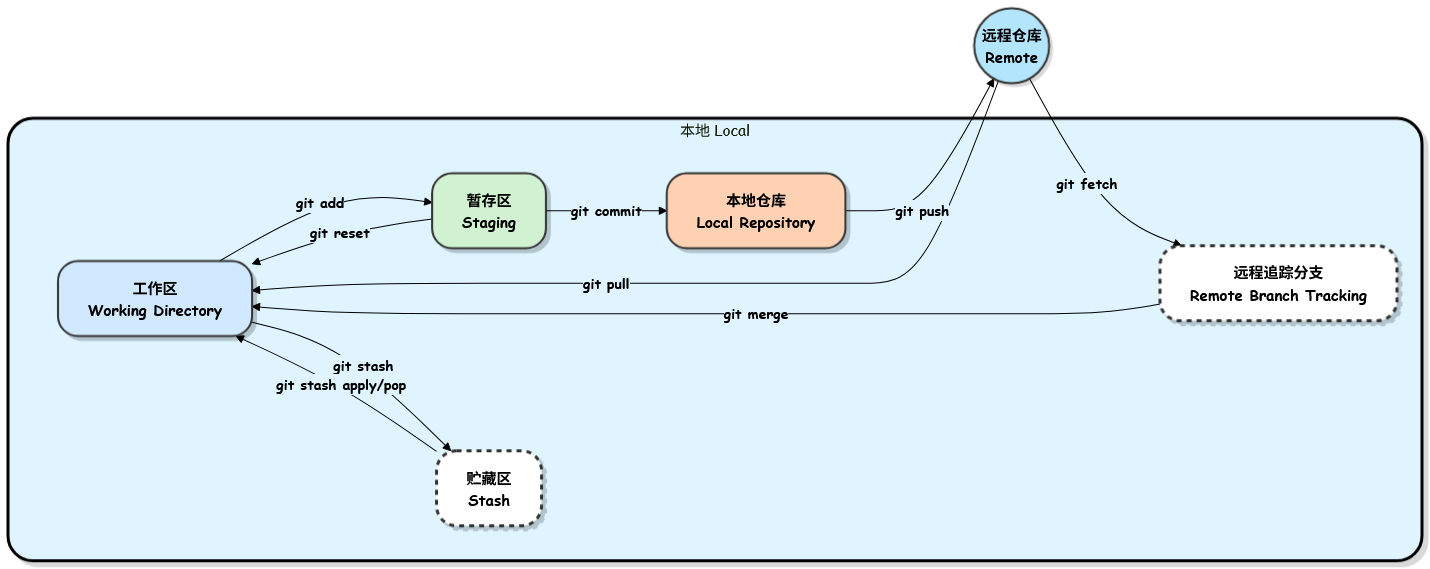
一、核心概念
| 区域 | 说明 |
|---|---|
| 工作区 (Working Directory) | 实际修改文件的地方(编写代码、删除文件等) |
| 暂存区 (Staging Area) | 临时存放准备提交的改动,使用 git add 加入 |
| 本地仓库 (Local Repository) | 正式保存项目历史,使用 git commit 提交 |
| 远程仓库 (Remote) | 托管在 GitHub/GitLab 等服务器上的共享仓库,使用 git push 上传 |
贮藏区 (stash)
- 作用:临时保存未完成的工作,避免提交不完整的代码。
- 常用命令:
git stash(藏起)、git stash pop(取出)
同步远程更新
git pull =git fetch +git merge(拉取并合并)- 分步操作:
git fetch 查看远程更新 →git merge合并
二、标准工作流程
# 1. 克隆远程仓库
git clone https://github.com/username/repo.git
cd repo

# 2. 创建并切换到新分支(避免直接改主分支)
git checkout -b new-feature

# 3. 在工作区修改文件(用编辑器编写代码)

# 4. 将修改加入暂存区
git add .                    # 添加所有改动
# 或 git add <文件名>         # 添加指定文件

# 5. 提交到本地仓库
git commit -m "Add new feature"

# 6. 拉取远程最新更改(避免冲突)
git pull origin main         # 假设主分支为 main

# 7. 推送到远程仓库
git push origin new-feature

# 8. 在 GitHub/GitLab 上创建 Pull Request (PR)
#    等待代码审查并通过

# 9. PR 合并后,更新本地主分支并删除特性分支
git checkout main
git pull origin main
git merge new-feature
git branch -d new-feature                 # 删除本地分支
git push origin --delete new-feature      # 删除远程分支
三、常用命令速查表
| 功能 | 命令 | 说明 |
|---|---|---|
| 克隆仓库 | git clone <url> |
|
| 创建新分支 | git checkout -b <branch> |
避免直接在主分支上进行开发 |
| 暂存文件 | git add <file> / git add . |
|
| 提交更改 | git commit -m "message" |
|
| 拉取更改 | git pull origin <branch> |
拉取远程分支并合并到当前分支 |
| 推送更改 | git push origin <branch> |
推送本地提交到远程仓库 |
| 合并更改 | git merge <branch> |
将指定分支合并到当前分支 |
| 删除本地分支 | git branch -d <branch> |
|
| 删除远程分支 | git push origin --delete <branch> |
|
| 暂存 | git stash |
暂存当前未提交的改动 |
| 暂存 | git stash pop |
恢复最近暂存的改动并删除暂存记录 |
| 下载远程更新 | git fetch |
下载远程更新但不合并 |
流程总结:修改 → 添加 add → 提交 commit → 推送 push