Git 分支管理(六)
6.分支管理
一、分支概述
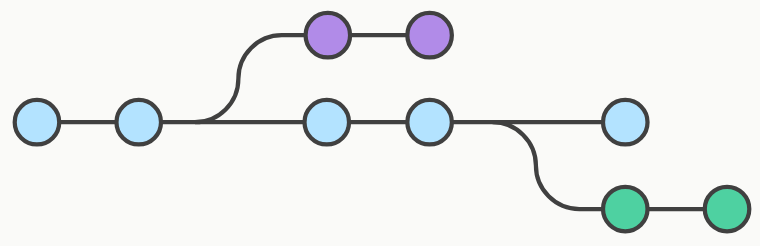
- 分支:一条独立的开发线,允许并行工作、开发新功能、修复 Bug 或进行实验,而不影响主代码库。
- Git 分支本质:一个指向某个提交快照的指针。
- 主分支:默认创建的分支名为
master 或main。
二、创建分支
| 命令 | 说明 |
|---|---|
git branch <branchname> |
创建新分支(但停留在当前分支) |
git checkout -b <branchname> |
创建新分支并立即切换到新分支 |
git switch -c <branchname> |
同上,更直观 |
示例:
git switch -c feature-xyz三、查看分支
| 命令 | 说明 |
|---|---|
git branch |
列出所有本地分支(当前分支前标 *) |
git branch -r |
列出所有远程分支 |
git branch -a |
列出所有本地和远程分支 |
四、切换分支
| 命令 | 说明 |
|---|---|
git checkout <branchname> |
切换到指定分支,并更新工作目录 |
git switch <branchname> |
更清晰的切换命令 |
切换分支时,Git 会用该分支的最后提交快照替换工作目录的内容。不同分支的文件互不影响。
五、合并分支
将指定分支的更改合并到当前分支:
git merge <branchname>典型流程:
git checkout main      # 切换到目标分支(如 main)
git merge feature-xyz  # 将 feature-xyz 合并到 main
六、解决合并冲突
当两个分支修改了同一文件的同一位置时,Git 无法自动合并,需要手动解决。
步骤:
执行
git merge后,Git 会提示冲突文件。打开冲突文件,找到类似如下标记:
<<<<<<< HEAD
当前分支的内容
=======
被合并分支的内容
>>>>>>> feature-xyz
手动修改文件,删除标记行,保留最终需要的内容。
标记冲突已解决:
git add <conflict-file>提交合并结果:
git commit -m "Merge branch 'feature-xyz'"(Git 会自动生成合并提交信息,也可自定义)
可使用
git mergetool启动图形化合并工具辅助解决。
七、删除分支
| 命令 | 说明 |
|---|---|
git branch -d <branchname> |
删除本地分支(要求已合并) |
git branch -D <branchname> |
强制删除本地分支(即使未合并) |
git push origin --delete <branchname> |
删除远程分支 |
八、实例
# 1. 初始化仓库并首次提交
mkdir gitdemo && cd gitdemo
git init
touch README
git add README
git commit -m '第一次版本提交'

# 2. 创建并切换到 testing 分支
git branch testing
git checkout testing   # 或 git switch testing

# 3. 在 testing 分支上修改(例如删除 README,添加新文件)
git rm README
touch newfile.txt
git add .
git commit -m 'testing 分支的修改'

# 4. 切换回 master 分支,文件状态恢复原样
git checkout master    # README 重新出现,newfile.txt 消失

# 5. 合并 testing 分支到 master
git merge testing      # 将 testing 的更改合并进来

# 6. 删除已合并的分支
git branch -d testing
九、命令手册(分支管理)
| 命令 | 说明 | 示例 |
|---|---|---|
git branch |
查看、创建或删除分支 | git branchgit branch new-branchgit branch -d old-branch |
git checkout |
切换分支或恢复文件 | git checkout branch-namegit checkout -- file.txt |
git switch |
专门用于切换分支 | git switch branch-namegit switch -c new-branch |
git merge |
合并指定分支到当前分支 | git merge branch-name |
git mergetool |
启动合并工具解决冲突 | git mergetool |
git log |
查看提交历史 | git log --oneline |
git stash |
临时保存未提交的更改 | git stashgit stash pop |
git tag |
标记特定提交 | git tag v1.0 |
git worktree |
在同一仓库中管理多个工作区 | git worktree add ../path branch-name |
十、重要提示
- 分支是轻量级的:切换分支时,Git 只会改变工作目录的内容,不会复制整个项目。
- 合并前确保工作区干净:建议先
git commit 或git stash当前未提交的改动。 - 频繁合并主分支:长期存在的特性分支应定期与主分支合并,减少最终冲突。
- Git 2.23+ 新命令:
git switch 和git restore 取代了git checkout的部分功能,更清晰易懂。